Sunday, August 26, 2012

6 Things You Can Do To Make the Office 2003 to 2010 Transition Smooth For Your Employees

Background

Here is truth #1: 

Office 2010 (and 2007 for that matter) is a dramatic step change for the Office 2003 user. There are countless articles and videos explaining the differences and how to use the new features. For the users' though there is one critical element missing: Convince me why I need to make the change.

This is where your IT department can come out either looking like a hero or looking like a villain.

Here is truth #2: 

Deploying the software is simple, getting people to be equally productive in the new software, quickly is more complex. The secret is you need to create desire and the support systems. If you set these things up first people will want to make the transition, they will want to learn, and you will not need to shell out a fortune to re-train everyone.

The Secret: Create Desire and Support

The main principles shown here are borrowed from Influencer: The Power to Change Anything. Look at each of these 6 principles and use them to create ideas that would work within your organization. You may not be able to do them all, but the more you leverage the better chance for success you have: shoot for 4 or more, if you do 3 or less, you are likely to fail.

1. Create Motivation for the Individuals to Change

It is not enough to pick a launch date and send out an advance email. This is turning the users into "victims" of IT. Rather you need to show them why this is something they need. In your communications:
  • Focus on what will make their job easier.
  • Focus on the features that will make them more productive and more effective.
  • Focus on the things they can now do in 2010 that they couldn't in 2003 to give them that extra, cool edge in their documents.
Look at this video link as an example. Ayca Yuksel of Microsoft does not start with all the technical differences, rather she emphasizes how much easier it is, new features to make your document even better, and subtly talks about the impact that will have on other people.


What can you do in your company?
  • Communicate: Don't just use a mass email to tell everyone what is going on. Leverage multiple communication methods: person to person, email, posters. 
  • Focus on benefits not what is different.  As the video example shows, Ayca starts with what is cool about the new software, not what is different or what will be challenging. Use examples to show people what their final products can look like. You want to create excitement about the change before the change occurs. 
  • Don't turn people into victims: One company I interact with gave the user zero head's up that today was their day and they were getting the change right now. They just pushed the software. One of the employees told me that the push happened in the middle of a class he was teaching and if it wasn't for a spare laptop, the class (of about 25 employees) would have come to a halt for 2 hours while the software was being pushed. Instead, put them in the driver seat, let them advance deploy the software to their PC prior to the mass force push. If you've generated curiosity and interest, then make the option available for them to "pull" the software early. This will allow them to schedule when the change takes place (like perhaps the week before class) and will allow them time to play with the new software when it is convenient. Employees could schedule a convenient block of time to make the change over and schedule time to get acquainted with the software and tour the training videos. 
Why should I spend the time to do this?
As mentioned in the example above, this company's IT department decided for everyone when they would get the software and there was little the users could do about it. Sometimes the software was deployed mid-meeting (and mid-training as the one employee said). For others it was during times when they needed to get a document out the door. As a result, two months after the change over most employees resented the change  and their IT department. 

On the flip side, the same company also deployed several other software packages and people were incredibly excited, they welcomed the changes, they were training each other in how to use the software, and  it was seen by IT as a success..

What did they do different? It wasn't communication, actually these deployments were under communicated and it was the one main criticism. It was that people started with what they could do now that they could not before; the benefit was clear. It did mean "training" but the excitement actually created an organic training and support network. 

2. Enable the Individuals to Learn the New Software

Office 2010 is difficult to use at first because it is such a dramatic difference there past experience one can leverage to help them use the new software. This is where training can come into play: more importantly practice! Microsoft and other companies have produced free videos and training material you can use to help with this; make it readily available and communicate it. But be selective, find high quality training material. Things to look for:

  • Does the training show learners how to solve practical problems? Theory and explanation is the "traditional" way of teaching and it has been repeatedly proven to be ineffective with adult learners. Instead, look for training that starts with "let's say you want to make a graph..." not training that focuses on how the ribbon is structured. Office does have an intuitive feel to it. The headings are basically verbs that describe what you want to do, getting people to think in this manner instead of "edit", "view", and "table" is key to helping them learn the new ribbon. 
  • Practice is more important than lecture. Does your training set up give them the opportunity to practice? If you show employees video based training, have you given them a place they can go and practice prior to it being deployed on their computer. Ideally, they should find something interesting they want to try, see how to do it, and then (right away) give it a shot. 
  • Quantity does not equal quality. Making a lot of training available is not the right answer either. Employees do not want to spend hours learning how to use the new software. Find short, effective materials. Better yet, provide resources (not training) so people can answer their own questions. For example, this video from Microsoft shows them how to use a tool they developed so you can find your favorite 2003 commands quicker.


3. Leverage "Peer" Motivation

"Peer pressure" is another method for enabling change. In many change efforts, peer pressure can actually be a source of resistance. People will look at what others are saying and doing and people (most) are influenced by the reactions they get. So use this to your advantage:
  • Look for people who have influence within the various parts of the organization. This is not, necessarily, top management. Rather look for the leaders without the titles or positions; the people everyone turns to during major announcements to see their reaction. Focus on winning these people over. They can easily amplify your attempts to get buy in and support.
  • Encourage people who are in support of Office 2010 to speak up about why they like it. Initially they might be hushed down, but continue to support and encourage them. Being "hushed down" is a natural reaction. However, repeated research has shown that there is a tipping point where when about 33% of the people are behind something, that number will snap to over 75% overnight. 

4. Create Peer Support Systems

This is great especially if you don't have a lot of money for training. Do things to enable employees to help each other. Enable the people who are good at Office 2010 to help others. Most folks do not call their IT department when they want to learn something, they ask someone on their floor who knows and get help from them. Leverage that in your deployment. Some ideas may include:
  • Offer to advance deploy Office 2010 to select people. Look for those who can quickly make the transition (maybe they have it at home) and who are willing and capable to help others.
  • Make sure their management identifies them as someone who got the software early and is available to help. This will set those folks apart as special individuals (a personal motivation force which some people respond to). 
  • Create a user forum where people can help each other out. Several benefits: 
    • Willing experts can contribute in a signifcant way to a wide circle of people
    • People who are still learning can contribute which enhances their understanding (think of the adage "you don't know something until you've taught it")
    • The forums can be searchable for quicker help
  • If you can't create a forum, think about an email group where people can volunteer to be on distribution.
  • Set up meetings where people can bring their computers, or make computers available and they can pull up files and get questions answered. It will solve individuals practical problems, a number of people can see and learn, and it might spawn additional discussions on other features that are available. 

 5. Acknowledge Efforts

Traditionally, this means setting up reward and incentive systems to encourage the change; which may or may  not be an appropriate option for you. However, think about:
  • How can you publicly acknowledge those who have contributed to the change over? Also what is the criteria for that acknowledgement?
  • How can you reward those who have contributed significantly? Remember, money is not the only motivation. Besides public acknowledgement, can you give them something? Could be the traditional "pizza party" or maybe tools to make life easier: wireless mouse, second monitor, better quality office equipment? Beyond money, most people want to contribute to a larger purpose (be significant), be self directing, and master new skills. Look for easy ways you can answer those needs.

6. Give the Employees the Tools

Many ideas that would fall under tools have already been discussed; things such as training, resources (like the reference sheet in the video above), forums, and people who can help. Look for ways you can enable the other 5 elements to happen, those are tools.

Conclusion

Although this article mainly focused on the Office 2003 to Office 2010 transition for your company, these six elements apply to making any significant software change a success. Success is not about simply putting the software on everyone's machine. It is about enabling them to use the tools quickly and effectively and the main driver there is setting the systems in place to both motivate and enable them to use that software.


Friday, May 4, 2012

Adirondacks Trip Blog: 1st day (Packing)

When I was camping every month, I could get home from school, shower, eat, and pack in under 60 minutes. Now it's taking me the better part of the morning. I'm definitely out of practice. However, when I was doing it in under 60 minutes, that didn't count troop gear or food. Plus I left most of the hardware in the pack year round.

Surprises this round
- Not using my pack. It is big, bulky and unnecessary for car camping. Instead clothes are in a duffle bag; probably first time in over 200 trips.

Thursday, May 3, 2012

Adirondacks Trip Blog: 1 Day To Go

Mobile Post:

Wanted to do more posting leading up to the trip, but the week has been crazy. I haven't shopped or packed yet, but have all day off tomorrow.

Been tracking the weather. Watching 3 sites and still getting 3 different reports. None of them a disastrous so we are still going. But, could either get rain, 39 degrees as the high temp, or clouds.

Saturday, April 28, 2012

Adirondacks Trip Blog: 5 Days to Go

This weekend I'll be escaping to the first camping trip of the year. My friend, Jeremy, and I are shooting for the Adirondacks but it is early in the season and weather and trail conditions are having us keep our options open. I won't be too crushed if we don't end up in the Adirondacks, most important thing is to get out there.

What the Outdoors Mean

Think back to a favorite place of yours. A place that you love to go. A place you are connected to. Maybe it's coming home to your parents after a long time away, or staying with your grandparents or your favorite aunt and uncle. Maybe you look forward to curling up on your own couch with a warm blanket especially when there is a chill in the outside air. Perhaps you have friends you can reconnect with in 30 seconds after years apart. Maybe for you it's getting on your motorcycle, jeep, or bicycle for that all day ride. Or what takes place when a band gets together to practice and the comradery joins you together. We can become immersed in these things and they can renew us. What happens internally is hard to replace or substitute. Skype is amazing, but it can't bring you home. That is this it to me. 

I grew up in the hill of Pennsylvania. It was farm country, it was hill country. The Horseshoe Trail ran through this region. As mentioned before, our troop made camping a priority. From February to as late into November as we dared (not so much due to weather rather deer season). Weather rarely altered our plans, and we took a few modern amenities. We almost always camped in tents. We always cooked on fires. Maybe a stove would help boil water, but we could function without it. We learned where to place our tents, not from a text book or lecture, but from observing, watching, and evaluating our mistakes. We learned where to find dry firewood in the pouring rain because we needed it and we knew how frustrating wet wood could be. 1 out of every 4 weekends we were living outdoors; 3 out of every 30 days. We became experts. I became an expert. 

But something else happened. It's not just developing skills that make these trips important. Like the metaphors in the first paragraph, when you are in your favorite place you de-clench. All the thoughts and things you preoccupy yourself with, the dozens of buzzing thoughts; you put those things away and tune in to what is around you. For me, I hear the air pushing over the land. When the wind picks up the leaves, or there is a sudden rushing in the distance, or rain begins to pound the ground over the next hill, I listen to those messages. I'm tuned in to what is going on around me, not the buzzing of thoughts I've accumulated over the months. 

I relax. I chase away the buzzing. I challenge myself to become better at my skills and learn new ones. I spend time with a side of me that rarely gets to come out and play. 

The Adirondacks

Last time I was in the Adirondacks was 1995 for the BSA High Adventure Camp. It was a mix of backpacking and canoe backpacking. This is where I earned the 50 miles afoot or afloat award. A hurricane decimated the park a week or so before our trip and many of the trails were still destroyed. A 2 hour trek took 8 hours. We were supposed to rondevu with the staff to pickup food and were so late to the checkpoint they were beginning to plan search parties. As a result, most of that 50 miles was afloat; and that was fine with me. 


Trip Preparations

This trip looks like it will be just Jeremy and I. Which is fine, we can move faster and there are fewer people to be concerned about. The drama of large group camping does not relax me. We've been discussing trails, locations, menus, travel plans, and the weather. We are 5 days out so that means I need to go do food shopping this week and we need to finalize our location and trails.

One major factor at this stage is the weather. For most folks, it is early in the season. Weather in Connecticut is ranging from high 50s during the day to close to freezing at night. My folks, in western New York got 6 inches of snow last weekend during a nor'easter and other areas got hit worse. The forecast for the area we are planning to go shows highs in the upper 20s for a few days, but they are expecting things to warm up. Additionally, there is rain in the forecast as we head into the weekend. It is too soon to make a firm call, but by watching the patterns and trends in the forecast we can better decide what we will most likely encounter. I don't mind the cold. The main thing is the wet. I can survive the wet, but hiking becomes dangerous and miserable. 

As the date gets closer, I'll update with how preparations are progressing. Share about the shopping, packing, the trip, and everything else. 


Monday, March 19, 2012

Outdoor Cooking: Cooking on Backpacking Trips

Intro

This post will be the first in a series on outdoor cooking techniques. I've been camping for over two decades and I have found that the majority of people really limit themselves in how they enjoy the outdoors and food is one notable area. As mentioned in the "Outdoors: Fire" post, my Boy Scout Troop (Troop 115: Scheoneck, PA) had a strong outdoor tradition, and the outdoors has became a tremendous source of serenity for me.

One particular tradition of Troop 115 was outdoor cooking, the mantra of the leaders was "anything you can cook indoors, we can cook outdoors," and I'm really looking forward to sharing more of the methods I've learned from them.

Perhaps the most challenging of all the cooking conditions is backpacking. When backpacking size, weight, and refrigeration are all working against you.

Food Options
Backpacker Meals: Perhaps the most basic and rudimentary option is the bagged backpacker meal. These are the meals you find at your favorite outdoor outfitter and they are basically: add hot water, wait, eat. The advantage is that they are quick, easy, and can refuel you. The disadvantage is that you sacrifice taste.

MRE (Meal Ready to Eat, aka K-rations): These are the ration packs the military use in the field. They contain more variety than backpacker meals; each MRE contains a main dish, side, a snack (of some form), and a desert. They also contain an "accessory" kit which contains random essential items. As military personnel will tell you, you won't like eating them for any long period of time.

Your Grocery Store: This is my preferred option. One thing to consider is that you won't know how the backpacker meal or MRE will impact your digestive system. Everyone is different, and cramps and diarrhea just make backpacking unbearable. Instead stay with what you know and have fun with it. In your grocery store, everything not in the freezer or refrigerator section is fair game. And for the weekend trip, many of the normal food preservation rules can be bent.


  • Produce: Many backpackers like tried foods. I believe it's because they believe it's lighter. However, you sacrifice taste, nutrients, and water which you have to drink more water to make up for. Dried fruits can be fun, but an apple can be very refreshing. 
    • Favorite: Shepherd Book's Tomato Salad Tribute. I'm a Firefly fan (Browncoat) and if you haven't watched the series you should. In the pilot episode, Shepherd Book makes for the crew a basic salad of tomatoes and seasoning. I have no idea what he puts in his salad, but I've packed in some cherry tomatoes, vegetable oil, salt, pepper, and oregano. I have a small seasoning kit for backpacking where I can store a small amount of oil and the seasonings. I carried the tomatoes in a plastic container. Then after a long day of hiking, I could whip up this quick appetizer and get some food energy and refreshment while I prepared dinner. 
  • Boxed foods: Pretty much anything in the aisles is fair game. However, pay attention to how the food needs to be prepared and what additional ingredients are needed. If something requires dairy, look for substitutes. The current uprising of food allergies has put many great products out there that are more digestible than powdered milk or powdered eggs. Be creative and lower your expectations. On one trip our group made Marconi and Cheese and substituted water for the milk. It is not a one for one mix; we basically added water until we got the consistency we wanted. It wasn't 100% like home, but after 4 days in the Adirondacks, it was tasty. 
  • Canned foods: Over the last two decades the variety of canned and packaged meats have grown. They are no where near fresh meats, but they are something you can work with.
    • Favorite: Shrimp Scampi: While raiding my local store for an upcoming trip I found canned shrimp and thought I could do a shrimp scampi. So after a long day on the trail, I cooked the pasta. Then drained the water and threw the shrimp and seasonings in. The seasonings were a mix of vegetable oil, pepper flakes, and a little lemon juice I put in another part of my seasoning kit. 
    • Favorite (sort of): BBQ Chicken and Teriyaki Noodles: I had also found in the store packaged barbecue chicken. On the trail I heated it up on my burner and made up some packaged Teriyaki Noodles. The chicken wasn't great, but I'm willing to explore other brands.
  • Cold Foods: As mentioned above, some "rules" can be bent. Keeping food cold on a backpacking trip can be a heavy endeavor and impossible if the trip lasts for more than a day. NOTE: This section is a "you are on your own here." I'm offering some ideas, but you need to make your own health decisions. There are multiple factors that can effect the safety of your food and those are your responsibility
    • Foods eaten within the first few hours of the trip: I've had success at freezing foods that needed to be kept cold and that I was planning on eating the first night. Specifically, I had taken some ready to bake dinner rolls and had frozen them. We started out and 4 hours later we were making camp. They had already thawed, and I was ready to bake them (I'll talk more about how below). 
    • I've really debated on pushing the envelope more than I have above. On one hand we are overly cautious about how we handle food, and on the other, that is one of the main reasons we don't have many of the food related illness issues that crop up across the globe. So let me leave it with, you are on your own, but there are situations where foods we normally expect to be refrigerated could be safe without it. But, that is between you and your body.

Cooking Options
Cooking Systems: I can say "back in my day" (which was over 15 years ago) these cooking systems weren't wide spread. I'm referring to the pot and burner as one unit like you find with Jetboil or other brands. If you aren't familiar with them, it's like having a large cup with it's own built in heater. It can boil water pretty quick. It is compact, light, and limits your options to pretty much boiling. Now, for the creative there is a lot you can do with boiling. On one trek a friend made fresh dumplings in her Jetboil.

Burners: There are a wide range of backpacking burners out there. The most common and popular you can find by asking about "cooking systems" at your favorite outfitter. "In my day," it was mainly Coleman fuel or propane. I currently carry a small propane burner. I take flack from my friends because it's bulkier and heavier than their "cooking system," however where most of them can only boil water, I can also pan fry. Coleman fuel was the preferred method. Propane is criticized because it can fail in cold temperatures and there can be issues with the check valve. However, I've found that if you don't maintain your Coleman stove (or lend it out) it's more likely you'll be stuck with no heat source at all.

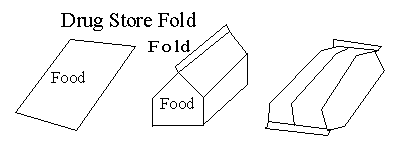
Fire: Check with the rules and regulations where you are camping and if they permit camp fires, this is by far the best. It is light (not much to carry), gives you a variety of cooking options (boiling, pan frying, baking), provides bodily warmth, and is an excellent morale booster. I plan to write a more detailed article on fire cooking including dutch ovens. In this section, since it is about backpacking, I would like to include a section on aluminum foil cooking. Aluminum foil is light weight and versatile. Here are two methods for foil cooking, which ever one you use, remember to use the Heavy Duty foil.
    From: usscouts.org
  • Foil wrap: This method is basically a heating (or reheating) method where you place the food on the foil and enclose it within the foil. Move some of the coals to the edge of the fire or a separate area (do not put the package on the fire, you'll burn your food). Then you can place coals on top or flip the package from time to time (or both). Change the coals as they burn out and keep an eye on the food. My roomate's number one piece of advice for avoiding burnt food: "keep an eye on it."
  • Reflector oven: This was the method I used at Roger's Ledge to bake the dinner rolls mentioned above (I think they were biscuits). Now many places sell kits to help with the angles, however you can accomplish the same with some wire and some foil. I built my "oven" by taking a wire clothes hanger and bending it into a 3-sided square (so one side of the square was missing). Next I picked my area; it should be ground level or a little elevated from the fire. The goal is to catch the heat radiating out and reflect it down onto your food. I, then, created a lean-to with the foil and the coat hanger. The coat hanger was driven into the ground by the fire and the opening of the lean-to faced the fire. Then I slid my food in. A plate or tray made of foil is helpful so you can pull the food out and check it without upsetting your very hot oven. The Boy Scout handbook (and other sites) contains a way you can determine the temperature at the cook site by how long you can hold your hand there. I use this to adjust the geometry of my oven or relocate it if necessary. 
Backpacking is a challenge. You need to balance the weight of what you carry with the level of comfort you want to maintain. Hopefully, this has given you some ideas on how food doesn't have to be one of those comfort sacrifices. 

If you've found this helpful or it gave you an idea, please post comments. 

Wednesday, March 7, 2012

My Job: Lean Six Sigma Black Belt (Part 1)

Hope I didn't miss the 6-panel, "what's my job" fad. Took me a few days to work it out, but this is the simplest I can do:


Friday, February 24, 2012

A Day Off


The Way We're Working Isn't Working: The Four Forgotten Needs That Energize Great Performance

I took today off. Let's call it an experiment, and if it works, I'll plan more of them. Why not, right now I get an extra week of vacation compared to my wife.

It was a planned thing, got permission and all. I've been reading The Way We're Working Isn't Working by Tony Schwartz and it reinforces healthy practices we all know, but many of us choose to ignore. For instance, machines depreciate in value the minute you purchase them. So we want to get the maximum production from them and keep them producing as much as possible until they are expended. People, on the other hand, increase in the value they contribute, yet many subtle practices, priorities, and expectations manage them more like machines than something that can grow. There is also a pattern in growth, there are periods of intense expulsion of energy and periods of rest where it looks like nothing is going on. The author is all about maximizing these periods and I'm currently reading on the benefits of short breaks, sleeping patterns, and days off.

Setting this day off was incredibly difficult for me. Over the last few weeks I've leveraged the open doors that have been presented and have initiated a good number of potentially beneficial projects. The last week and a half has been dominated by emails and phone calls as things start moving and contacting people to keep things moving. It just really wasn't a good time for a day off. But, I think that's the point. Ironically, the section in the book talked about a study with consultants to determine the benefit of them taking time off. Most of them resisted (can't imagine why), but the study showed that after a period of time where a regular day off was inserted and used (no emails, no phone calls; i.e., no work!) their productivity showed a remarkable increase.

I'm really not surprised by this, nor did I need this book to tell me how healthy time off is mentally and physically. The biggest challenge (and I see this almost everywhere) is to make your goal a priority in your daily decision making. I've seen many goals never become reality because when it comes to our daily decision making, the goals don't get the strongest vote. Well, not today.

How did I spend my day off? It first began with some rules:

  1. No TV. Hours can go by and you rarely get anything out of it. It just puts life on pause. Don't get me wrong, it's a good break and there is some really good stuff out there, but today's goal wasn't to hit pause for 8 hours.
  2. No work. I was very tempted to sneak back in and work quietly. "No! Bad!"
  3. No work around the house. That's substitution. Did that once before for several months, burned out, badly (another story). 
  4. Early retirement: How would I spend the day if I was retired? A man I respect retired recently, and a colleague ran into him a few days ago. The man said retirement was fine. He was still finding his rhythm. The hardest thing for him was on Sunday nights, he'd still begin to plan what he had to do at work on Monday and then would remember he wasn't going to work. Imagine that, 40 some years at a job and you are left with those kinds of habits when you retire. I saw myself in that comment, and it seemed sad.
So, I made some plans, actually it was more of a list of ideas. Most of which got shot down when it snowed 2 inches and then rained all day. Instead, I had breakfast, shoveled snow, played a new video game until the library opened, and then headed out to the library and grabbed a sandwich at Carlo and Son's. Then stopped by Verizon (been thinking about upgrading from my Droid 1) and off to the gym. 

All week I've been very overwhelmed, and although there will still be work on Monday at work, I'm finding it easier to relax and un-clutch that muscle. And this is definitely the time of year to do it. The culture at my company really ramps up work this time of year and there isn't a holiday from New Year's to Good Friday to create a 3 day weekend. Well, the day isn't done yet. And the full benefit probably won't be felt till after the weekend or until Monday or Tuesday (or beyond). But, it feels beneficial and I know it was the right time and the right thing to do.

Wednesday, February 15, 2012

Outdoors: Fire

Quick post: Ever since I was in Scouts, I have loved the outdoors. And I was part of a well lead troop (the other boys were rough but the leaders were phenomenal). We were outdoors one weekend a month, every month except for maybe December and January. December was deer hunting season and it was best to just stay out of the way of flying lead, and January we were prepping for the February Klondike.

One of the things I learned from all those trips, and in every kind of weather was how to build a fire irregardless of what the weather was doing. Dry wood is not hard to find, some tips:

  • The branches laying flat on the wet ground is probably wet. Move on. 
  • The branches not actually touching the ground are dry; drier.
  • (Now most purists won't like this, but if you do it right it can be a win-win for you and the tree) Dead branches on a tree tend to stay dry. Don't take live branches; it hurts the tree and it won't burn well. But many trees have dead branches and limbs that if you remove them cleanly, like a gardener or landscaper would, you are helping the tree and in return getting dry wood.
  • Don't burn leaves. It's like burning a cigarette, you just get smoke. Leaves aren't nature's paper. 
  • Dry pine needles are the best. If it's been raining you can usually find some at the base of a pine tree. Pine is an awesome wood. It puts off a lot of light and burns easily. Creates smoke, but there is no such thing as a free lunch.
  • Most fire pits have charred logs and hearty coals that still have some life in them. At a public camp ground I can often easily find cut logs ready for me.


Well, like I said quick post. Gotta run.

Sunday, February 12, 2012

Tardis Tissue Box


Search for "Tardis Tissue Box" and my page comes up as one of the top hits.

Here's the back story: I have always been the kind of person that if something didn't exist I would take it upon myself to figure out how to create it. That's lead to some interesting adventures over the past years including desires to learn about computers, electronics, crocheting, and herbology. So I'm in college, living on my own, and am standing in the grocery store looking at tissue boxes. For years Kleenex made a tissue box with a nautical print on it, but it was gone. There was also one with astrology symbols, but it was gone too. Only thing there was boxes with flowers and ducks. When I got home I called Kleenex and they told me that they discontinued those lines. I told them that I didn't find flowers and ducks very interesting and they told me that they weren't marketing to men. Hm. 3 billion men in the world and no interest to market to us. So, being the kind of person to just work around problems, I decided at some point to make a tissue box cover that said something about me and my interests, so guests wouldn't think I was the kind of guy that liked flowers or ducks. If you are going to own something, make it say something about who you are.

So I chewed on this problem in the back of my mind for a few years and eventually decided that I would make a tissue box cover that looked like Doctor Who's Tardis. The idea was masculine, an off reference at the time (Doctor Who was off the air for several years), and something from my childhood that I really enjoyed.

In 2007, one event lead to the two critical things needed. The event: Leah got a job at Michael's Arts & Crafts allowing me both the time and discounted materials to attempt this. I studied photos, created detailed exterior drawings, and come up with a plan to build this thing. I bought several small boxes to experiment with paint colors and techniques and spent many a creative evening in the shop listening to music and working.

The end result is here. In 2008, I put the project on the web and wrote to a Doctor Who Podcast that I put the idea online. The response from the hosts of the podcast was awesome. They read my letter and got all geeked out over the tissue box. My webpage got a ton of traffic from all over the world and it came up as one of the top results on Goggle when you searched for "Tardis Tissue Box."

Since then, at least 3 people have emailed me asking for directions on how they can build their own. I never made any official "plans" but I send them the reference drawings and what I did to get there. Writing that email the first time was incredibly difficult, primarily because I had to relive all the work and thought process that went into this. People suggested I build more, but it is one of those labors of love that I only want to do once. Even though it was hard work, that I likely won't do again, I am very proud of my box. It is unique and it represents me. If you are going to invest in something, make sure it says something unique about you.

UPDATE:


My Charter

Five centuries ago, improvements in travel and communication generated a fresh wave of creativity where new concepts and ideas coexisted with the traditional and romantic. Art and science were indistinguishable and they were being explored by the same people simultaneously. Stories, religions, and beliefs from ancient and more recent cultures served as sources of inspiration. And collaborative sharing could take place with others who lived far away.

In our generation, we've seen technology wipe out the limitations distance created. People can collaborate live from any corner from the globe, and more importantly, through the internet, there is a universal library unlike any that has ever existed. This library contains books, videos, ideas formally published and ideas collaboratively assembled. You can learn about any topic and contribute your knowledge. It can be a new, redefining, Renaissance.

So here I am. I am creating this blog for several reason:

  1. To encourage you and myself to be creative, develop passions, and to be as diverse and wonderful as we were created to be.
  2. An experiment: To contribute myself to the universal library. Facebook has been wonderful for networking with family and friends, but what I am passionate to share a) doesn't belong there and b) would be too long for a typical post and would likely be passed over. Here, on a web log, rants are expected. I don't plan to rant, rather I'm planning on sharing the various things I'm interested in and curious about and I hope it inspires you to do the same.
So let the experiment begin.